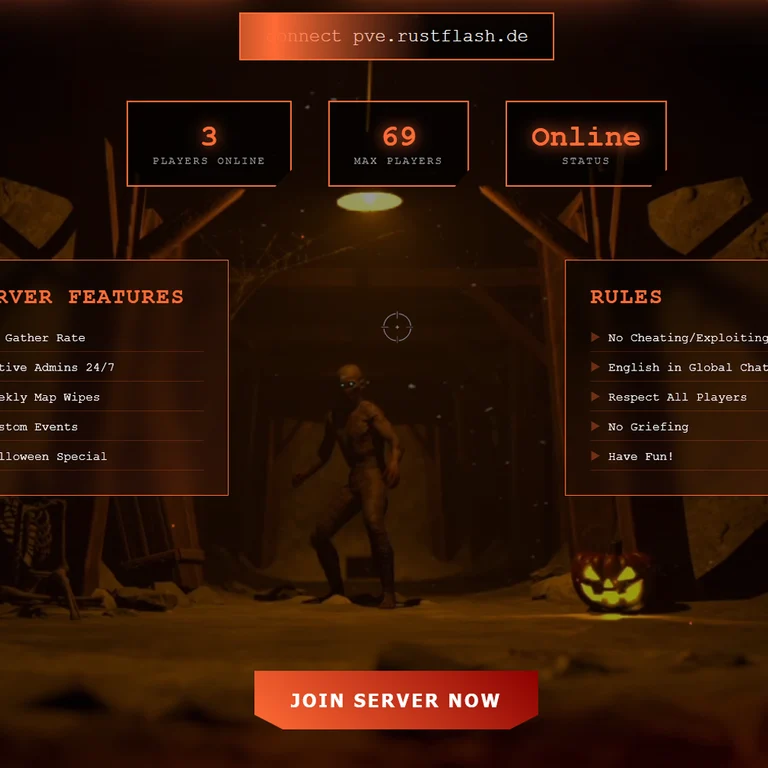
Project details
Project: HalloweenWebPage
dev language: HTML/CSS/JS
Plugin language: en Author: @RustFlash
This is a premium Halloween-themed web design that you can upload to any web host of your choice. It's complete with spooky effects and atmospheric features! It has everything you need for a haunting presentation. You can also extend or customize it to your liking with little knowledge. The webdesign was written especially like a Rust plugin, you can set everything in a config like with Rust plugins.
Please understand that I do not incorporate any special requests or make the web hosting customizations for everyone. If you are ready for a premium web design, please follow the detailed documentation!
You can make adjustments very easily and quickly through the config.json file in the main directory.
I have deliberately built the website a bit like a Rust plugin so that everyone can use it without html/css or js knowledge. You can enter your data in the config and don't have to search and fiddle around in large html files.
{
  "serverName": "Your Server Name",
  "serverIP": "connect your.server.ip",
  "battlemetrics": { "serverId": 12345678 },
  "features": ["Feature 1", "Feature 2"],
  "rules": ["Rule 1", "Rule 2"],
  "effects": {
    "particles": true,
    "bloodDrips": true,
    "fog": true,
    "sounds": true
  },
  "colors": {
    "primary": "#ff6b35",
    "secondary": "#8b0000"
  },
  "links": {
    "impressum": "https://yourwebsite/impressum.html",
    "contact": "test@test.de",
    "discord": "https://discord.gg/...",
    "website": "https://yourwebsite.com",
    "shop": "https://yourshop.com"
  }
}
Halloween_WebPage/
├── css/
│   └── style.css
├── img/
│   ├── halloween.webm
│   └── fav.png
├── js/
│   └── app.js
├── config.json
├── halloween.mp3
├── index.html
└── readme.md
Step 1: [Unzip and upload files]
Step 2: [Edit the config.json file]
Step 3: [Add your media files]
Step 4: Done
All visual and audio effects can be toggled in the config.json:
https://halloween.rustflash.de
load, run, enjoy the spooks 🎃👻