# MyNotify
**__Project details__**
**Project:** *MyNotify*
**Dev Language:** *C# (Oxide/uMod)*
**Plugin Language:** *English, German, Russian*
**Author:** [@RustFlash](https://github.com/Flash-Ticker)
[](https://youtu.be/xJzMHkWhYpw?si=Xg3FFy5DJ8DGYJIP)
---
## Description
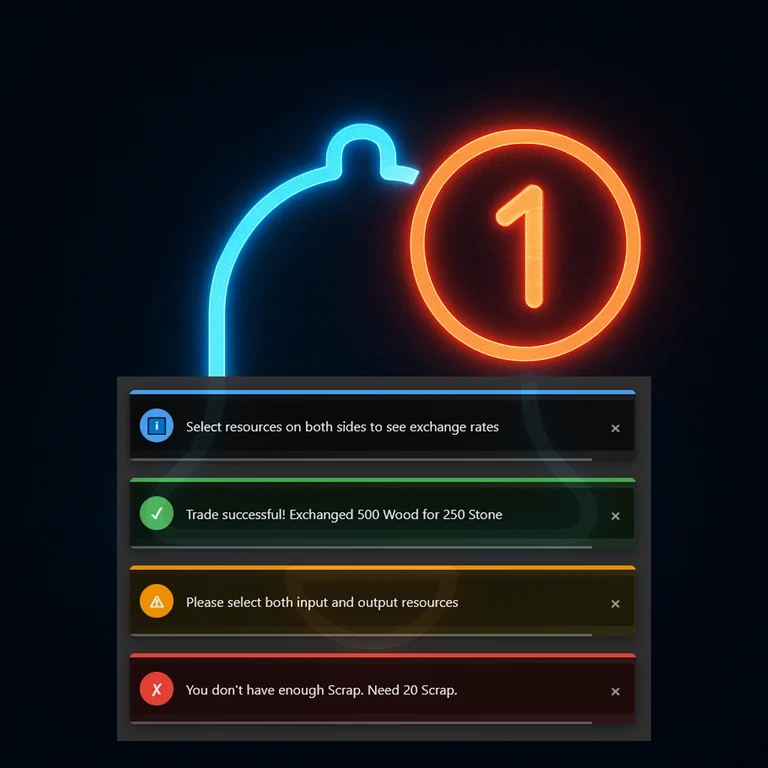
MyNotify is a powerful and customizable notification system for Rust servers. It provides an elegant way to display notifications to players with different styles, colors, and formats. The plugin is API-compatible with the original Notify plugin, allowing it to work seamlessly with other plugins that use the Notify API.
---
## Features
- **5 Predefined Notification Types**:
- **Info** (Blue) - Standard notifications
- **Error** (Red) - Error messages
- **Success** (Green) - Success messages
- **Warning** (Yellow/Orange) - Warning messages
- **Event** (Purple) - Special event announcements with star symbol
- **Highly Customizable**:
- Adjust notification position, size, and appearance
- Customize colors, icons, and text styles
- Configure fade-in and fade-out animations
- Set custom duration for each notification type
- Add clickable commands to notifications
- **Multi-language Support**:
- English
- German
- Russian
- Easy to add more languages
- **API Compatible**:
- Works with plugins designed for the original Notify
- Simple API for other plugins to send notifications
- **Performance Optimized**:
- Efficient UI rendering
- Automatic cleanup of expired notifications
- Limited maximum notifications on screen
---
## ChatCommands & ConsoleCommands
### 🧾 Chat Commands
- `/mynotify.show [type] [message]` - Sends a notification to yourself
- Example: `/mynotify.show 0 Welcome to the server!`
- `/mynotify.player [playerID] [type] [message]` - Sends a notification to a specific player
- Example: `/mynotify.player 76561198012345678 2 Your base has been upgraded!`
- `/mynotify.allplayers [type] [message]` - Sends a notification to all players
- Example: `/mynotify.allplayers 4 PVP Event starting in 5 minutes at Dome!`
### Compatibility Commands
These commands are included for compatibility with the original Notify plugin:
- `/notify.show [type] [message]`
- `/notify.player [playerID] [type] [message]`
- `/notify.allplayers [type] [message]`
---
## Permissions
- `mynotify.see` - Allows player to see notifications (give to all players)
- `mynotify.notify` - Allows player to send notifications to themselves
- `mynotify.player` - Allows player to send notifications to a specific player
- `mynotify.allplayer` - Allows player to send notifications to all players
## Config
```json
{
"DisplayType": "Overlay",
"Height": 50.0,
"Width": 260.0,
"XMargin": 20.0,
"YMargin": 5.0,
"YStartPosition": -50.0,
"ShowAtTopRight": true,
"DefaultDuration": 5.0,
"MaxNotificationsOnScreen": 5,
"SendChatMessageIfNoPermission": true,
"NotificationTypes": {
"0": {
"Enabled": true,
"BackgroundColor": "0.1 0.1 0.1 0.9",
"BorderColor": "0.4 0.6 1 1",
"UseGradient": true,
"GradientColor": "0.4 0.6 1 0.35",
"IconText": "i",
"IconColor": "0.4 0.6 1 1",
"TitleKey": "Notification",
"FadeIn": 0.2,
"FadeOut": 0.5,
"SoundEffect": "assets/bundled/prefabs/fx/notice/item.select.fx.prefab"
// ... (additional settings)
},
// ... (other notification types)
}
}
```
## Multilingual
Default: EN <br>
DE | ES | FR | IT | NL | PL | PT | RU | SE | TR | UK | CN | KR | CH
## API
### For Plugin Developers
Add a reference to MyNotify in your plugin:
```csharp
[PluginReference] private Plugin MyNotify;
```
### API Methods
```csharp
// Send notification to a player
MyNotify?.Call("SendNotify", player, type, message);
// Send notification by Steam ID (string)
MyNotify?.Call("SendNotify", "76561198012345678", type, message);
// Send notification by Steam ID (ulong)
MyNotify?.Call("SendNotify", 76561198012345678UL, type, message);
// Send notification to all players
MyNotify?.Call("SendNotifyToAllPlayers", type, message);
```
### Notification Types
- **0** - Info (Blue)
- **1** - Error (Red)
- **2** - Success (Green)
- **3** - Warning (Yellow/Orange)
- **4** - Event (Purple)
### Example Usage
```csharp
// Info notification (blue)
MyNotify?.Call("SendNotify", player, 0, "Welcome to the server!");
// Error notification (red)
MyNotify?.Call("SendNotify", player, 1, "You don't have permission to do that!");
// Success notification (green)
MyNotify?.Call("SendNotify", player, 2, "Item purchased successfully!");
// Warning notification (yellow/orange)
MyNotify?.Call("SendNotify", player, 3, "PVP will be enabled in 5 minutes!");
// Event notification (purple)
MyNotify?.Call("SendNotify", player, 4, "⭐ Special event starting at Airfield in 10 minutes!");```
### Alternative Method (Plugin-Independent)
```csharp
// Use Interface.CallHook for better compatibility
Interface.CallHook("SendNotify", player, type, message);
```
load, run, enjoy 💝